Features

Every tool, all in one app.

From a single primitive drag to push/pull on a slanted face, here is what BlockBuilder Studio can do on desktop, tablet, and phone. Same project, same STL out.

v0.6.0 just shipped

Ten new things
testers asked for.

Four rounds of polish from the private beta cohort, all in v0.6. Each item is direct-modelling friendly, no parametric-history baggage.

01

Intersect boolean

Already had Group (union) and Hole + Group (subtract). Now there's Intersect too. Select two solids, press Ctrl+Shift+G, get only the volume in both. Reversible until you Bake.

02

Dimensions on screen

Select any shape, X / Y / Z labels appear at the bounding-box edges in your active unit. No more squinting at the properties panel to check if the bracket is 12.4 or 12.5 mm.

03

Edge-hover dimensions

Move the cursor near any feature edge. A small label pops up at the midpoint with the edge's exact length. Filters out the hidden triangulation diagonal a Box's quad face has, only edges you can actually see.

04

Push / Pull on any face

Click a face, including slanted ones, then drag away from it. A new prism extrudes outward along that face's normal, depth set by mouse travel. The 30° wall finally gets its tab in one gesture.

05

Pattern v2: Skip instances

Array tool gains a "Skip instances" field. Type 3, 7, 9 and those copies drop out of the pattern. Hex grids with a missing centre, masonry with feature gaps, no more duplicate-then-delete cycles.

06

Resize handles snap to neighbours

The white face squares used to snap only to the grid. Now they also snap to neighbour shapes' bounding-box edges, mid-planes, and the world origin. Line two parts up by dragging until they click into place.

07

Chamfer + Fillet on 10 primitives

Box, Cylinder, Cone, Tube, Polygon, Star, Heart, Wedge, Roof, Pyramid all gain Chamfer and Fillet parameters. Sphere / Torus / Dome have no sharp edges, so nothing to bevel.

08

Math in any number field

Type 2*12+4, (40-6)/2, sqrt(50), or max(10, 8) into any width / position / size input. Press Enter, it evaluates.

09

Shortcuts palette + quickstart

Ctrl+K opens a searchable list of every shortcut. First-launch scene shows a 4-step walkthrough instead of an empty card.

10

Reference geometry

Three new pickers: Ref Plane (3 points), Ref Axis (along any edge), Midpoint marker. Cyan construction entities, not printable. Body-drag and resize handles snap to them. PLANE_3P rows in the Outliner can be set as the active workplane in one click, perfect for building on an arbitrary tilted face.

Coming next (working order). Each one ships as its own update when ready, no big-bang rewrites.

Features

Everything you need to model
for the printer. Nothing you don't.

13 primitive shapes, full CSG (union, subtraction, intersection), STL/OBJ/STEP import-export, sketches, slicing, hollowing, arrays, ruler, all running locally on your machine.
Core feature
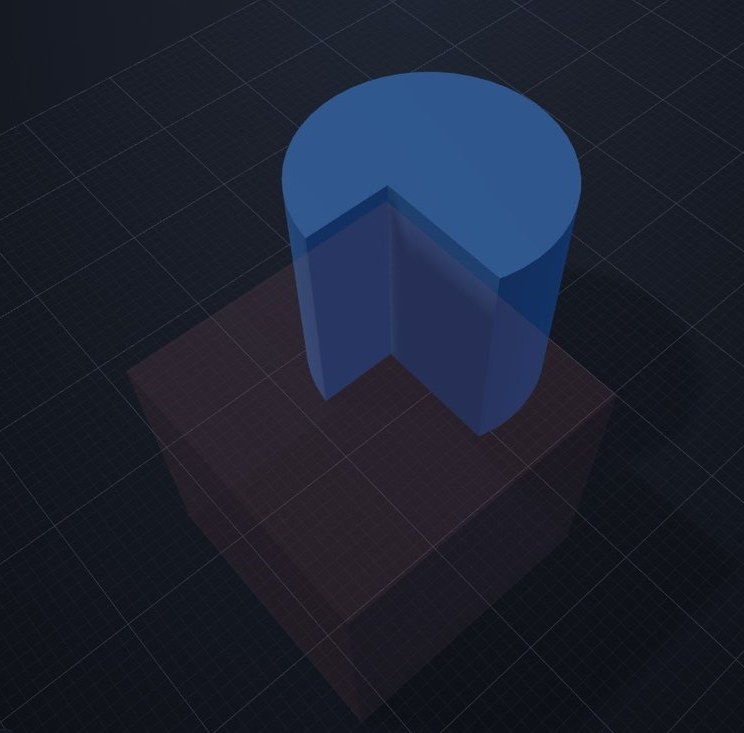
A blue solid cylinder overlapping a red translucent hole-box, ready to be combined via Group.

Solid + Hole booleans

Toggle a shape to hole and it carves into anything it overlaps with after Group. Solids merge, holes subtract. Fully reversible until you bake. Powered by three-bvh-csg.

Export
Toolbar export buttons, Save, Upload, Import, STL, STEP, OBJ, with the OBJ tooltip showing its description.

STL · OBJ · STEP export

Printer-ready binary STL, Wavefront OBJ, or AP203 faceted-brep STEP for CAD/CAM pipelines. Bring in any mesh as an editable shape, your imports become primitives.

Sketch tools

Extrude polygons, scribble free-hand outlines, revolve profiles into lathe-style solids.

Cut along plane

Bambu-style. Slice along X, Y, or Z into two halves with a live plane preview.

Hollow / Shell

Carve the inside of any shape at a chosen wall thickness. Print-ready shells in two clicks.

Ruler · vertex snap

Click two points. Distance + per-axis deltas. Locks to vertices so measurements are exact.

Linear + circular arrays

N copies along a line with spacing, or around an axis with a chosen total angle.

Workplane on face

Drop the active workplane on any face. New shapes spawn aligned to that face's normal.

Live volume + surface area

Estimate filament cost without leaving the app.

Volume
42.18 cm³
Surface
87.41 cm²
Triangles
2, 164